
24 November, 2025
Introduction
Have you ever wondered how websites and apps know what you like before you even ask? That’s the power of Artificial Intelligence (AI) working behind the scenes. Today, AI is not just about robots or sci-fi movies. It’s also making big changes in how websites and mobile apps are being designed and this is called Artificial Intelligence in UX design. In this blog, we will explore how AI is used in UX (User Experience) design, what tools are available, how it helps designers and what the future looks like. Let’s dive in!
UX stands for user experience. It means how a user feels while using a website, mobile app or any digital product. Is it easy to use? Does it look good? Is it fast? That’s all the part of UX. A good UX design makes people happy. A user will leave the website in seconds if it has non-friendly UX.
In very basic language, AI (Artificial Intelligence) is a technology that allows computers to think, learn and make decisions, almost like humans. It uses data, pattern and logic to improve processes. In UX, designers use AI for user behavior analysis, test design faster and even create user interfaces automatically.
Here are some real numbers to show why Artificial Intelligence in UI/UX is a game changer:
Clearly, AI can make UX design faster, smarter and more user friendly.
So here’s the thing AI in UX design isn’t some fancy, futuristic thing anymore. It’s already here doing a ton of the heavy lifting in ways most people don’t even notice. It’s not magic, just some super smart tech doing what it does best-learning, creating adapting and helping us build better digital experiences. Let’s break down the main stuff behind all the AI buzz.
Machine Learning (or ML if you’re into the whole acronym thing) is like the brainy part of AI. It looks at tons of user data and picks up on patterns—what people click on, how they scroll, where they spend time and so on.
Example: Ever wondered how Spotify just knows your vibe for the week. That’s ML at work.
This one lets computers understand and respond to human language—like actual words not just code.
Yup AI can “see” too. Computer Vision is what lets machines recognize things in images and videos like faces, gestures, or objects.
Example: Snapchat filters..? Face ID on your phone?? All thanks to computer vision doing its thing.
This is the part of AI that creates stuff from scratch. Give it an idea or prompt and it’ll generate designs, layouts or even full-blown websites.
Example: Wix ADI lets you build a site by answering a few questions Uizard can turn a hand-drawn sketch into a clickable design. No coding… no stress.
Think of this one like the AI that learns by trying stuff and getting feedback. Like, when you try a new button layout see how users react and make changes? Same idea.
Example: Netflix always seems to move things around right? That’s because it’s testing what works best for you and tweaking things in real-time.
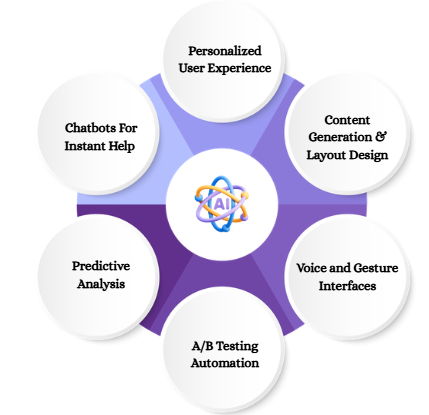
Let’s explore how AI is used in real life UX projects:
AI learn what users like and gives suggestions. Just like Netflix shows you movies based on what you watched before.
Example: Amazon uses AI to suggest products you may like. This is based on your past searches, clicks and purchases.
Results: Higher engagement and better user satisfaction.
AI powered chatbots are now common on websites. They talk to users, answer questions and solve queries, all in real time.
Example: Websites like Zomato and Swiggy uses chatbots for order tracking and help.
Impact: 70% of users prefer talking to bots for simple questions.
AI can predict what users might do next. This helps designers to plan better.
Example: A travel website may suggest flights or hotels you’ll likely choose, based on your browsing history.
Benefits: Helps users save time while boosting conversion rates.
Before finalizing a design, companies test two or more version (A/B Testing). AI speeds this up and gives better results.
Example: Google optimize uses AI to run smart A/B tests.
Result: Faster decision making and improved UX.
With AI, we can use voice or gestures instead of clicks.
Example: Siri, Alexa and Google Assistant are AI powered user experience voice bots.
Fun Fact: 50% of online searches are now voice based.
Al tools can help generate headlines, button texts or even full website layouts!
Example: Wix ADI (Artificial Design Intelligence) helps build websites with almost zero effort.
Results: Speeds up development and helps non-designers create digital products.
Here are some UX design automation tools that designers are using nowadays:
| Tool Name | What it does |
| Uizard | Turn wireframes into a clickable design |
| Figma AI Plugins | Auto suggest design fixes and ideas |
| Jasper AI | Write content for buttons, pages and more |
| Dovetail | AI for user behavior analysis and feedback |
| Hotjar | Tracks where users click and scroll |
Most people believe that AI will replace their jobs. But in reality, AI helps designers, not replace them.
Here’s how:
AI is like a smart assistant for UX designers.
Here are some success stories of using Artificial Intelligence in UI/UX.
Amazon: Amazon uses AI to personalize shopping. From product suggestions to smart search filters, AI drives the entire user journey.
Result: Amazon AI driven UX is a major reason for its $500+ billion annual sales.
Spotify: Spotify tracks what you listen to and recommends music using machine learning in UX design.
Result: 80% of users use Spotify’s AI powered playlists like “Discover Weekly”.
Airbnb: Airbnb uses AI to show travelers the most relevant homes, price and locations.
Results: Increased user satisfaction and more bookings.
AI is still growing. In the next few years, it will become even more powerful. Here’s what we can expect:
So, always mix AI with human thinking for the best results, not just UX design there is a survey article published by GoodFirms exploring how AI is transforming content writing, SEO, and digital marketing.
It highlights how AI tools boost efficiency, personalize user experiences, and enhance search performance.
AI is transforming the way we design user experience. From personalized journey to real time chat, from faster testing to small layouts, AI is making UX design more effective and user friendly. But always remember, AI is just a tool. The real magic lies in human creativity. The best results happen when AI and designers work together.
So if you’re a designer, now is the best time to learn and use AI in your UX process. The future is already here, and it looks amazing.

Leave a Reply